A First World (Desktop) Background Problem

An excerpt from my my diary, from the 15th of February, 2024.
After taking a bit of a break to just watch some videos, and get more comfy with the environment, I figured it was time to get back into it. First off, I still have absolutely no idea if my webcam will work. With no built in way to check, I figure some software off the Pop Shop would work just fine. Grab some program literally just called Camera, which seemed simple enough, but couldn’t recognize the device; no idea why. Maybe it’s expecting a different type of equipment, but regardless, there are other options. Perhaps I needed some controller application first—like the proprietary Logitech software on Windows—but obviously something free instead. Quickly found Cameractris, which was exactly what I was looking for, and it absolutely recognized my camera! The other Camera app still couldn’t, so I also found Webcamoid...but the package release was from 2016. Alright, well clearly there’s something else up here.
I head over to Github, and find the project does prebuilt releases behind a tiny paywall. Could try my hand at compiling, but I still have no idea what I’m doing. Frankly, neither that, nor sending off my credit card information for something I’ve never used, feels particularly great right now. So, I decide I may as well try out the ancient package, see if it works at all, and if so, if it’s at all useful first. I download it, and it does indeed recognize the webcam, and take pictures! Though, in that moment, I had a pretty obvious reminder that Open Broadcaster Software exists, and I use it rather regularly. Download that, works like a charm instantly, and it has many other uses for local recordings too! Also, now seems like a good time to get dedicated audio editing software, and as I know Audacity had that buyout a while back, I figure now’s a great time to check out Tenacity! No sense in sticking around on my final 2.X version, when I can grab that right this second after all! Boot it up, recording works great, and that’s another problem solved!
Perhaps now it’s time for something more personal: let’s finally change my desktop background! Yeah, I’m gonna throw my Foxfire art on one monitor, and some fan art a super kind person recently made of him on the other monitor! Oh wait, what? I can’t have a unique background for each monitor, seriously‽ Of all the things to have a snag on, this is certainly not one of them I was expecting. It’s really not that big of a deal, but at the same time it was driving me a bit crazy; like, surely I was doing something wrong—right? Well, actually no; after some digging, I find that by default, you legitimately cannot do this action. I checked the System76 FAQ, and did find some info on theme customization through GNOME Tweaks, but it didn’t seem like it covered unique monitor backgrounds. Thankfully, the years old Reddit comment search result history gods provided me with the sweet nectar of a solution...kind of.
I install GNOME Tweaks, and while it has no multi image support, you can set a home and lock screen background with different fit options. For whatever reason, changing the image did nothing, and altering the fit options of the lock screen, changed the fit options of the desktop. Okay, whatever, it was stated it wasn’t exactly supported in System76’s documentation; I can still work with this! The image that comment had showed a spanned fit, which, okay wow, my Foxfire is a WIDE boy now. Excellent, so all I have to do to have two images on my monitors is: create a single image. Straightforward, except the fan art one is not 1920x1080 like the other background. So, it’s time to open Krita, and scale it down so it’s exactly that, for parity with the other image in a 3840x1080 frame. Quick math has that at 72%, so I transform it, save the thing, set it as a background, hit span and—it works! Ah, first world problems, but I solved it!
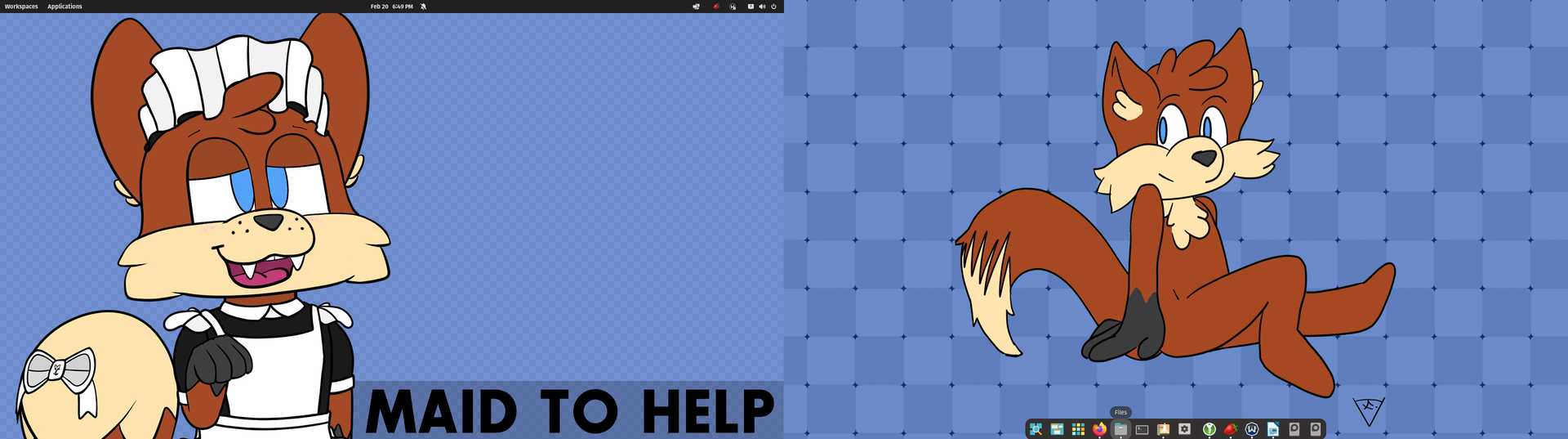
“Dual monitor backgrounds in Pop!_OS”
Also, as an aside, I love the built in email app Geary. God, it’s so simple and sleek, literally exactly what I need, and nothing more. I was rocking Thunderbird for Windows recently since, well, Mozilla and free software, but I might honestly just stick with Geary on GNU/Linux. Not only that but, wow, the integration if you allow it. You can straight up integrate anything from Google you want, most notable is direct connection to Google drive from within the file explorer. I know I really shouldn’t be excited about proprietary connections, and I didn’t enable anything outside of drive mounting, but it’s just really cool how responsive it is. I still unfortunately use Google drive a lot, and this is legitimately a better way to access it than through Google itself. No extra non-free nonsense needed, aside from the servers themselves, which I’ll accept for now. Only issue seems to be that clicking links in emails takes a long time to open in Firefox. No clue why—it’s not Firefox itself—I can literally copy and paste the link, and load the page instantly; an odd little caveat.
All writing is licensed under CC-BY-ND with attribution to Foxfire. The FSF recommends this license for opinion pieces.